 Flash Operator Panel 2
Description
FOP2 IVR Flow lets you build simple or complex IVR and call flows using a drag and drop visual editor. It supports API calls, logic and time conditions, text to speech, DTMF input, and ASR based interactions.
The module works out of the box with Issabel and FreePBX backends. It can also be adapted to other Asterisk based systems, but those deployments usually require some manual setup for recordings and valid destinations through a custom functions file.
Installation
Install the module from FOP2 Manager just like any other plugin or module:
- Open your FOP2 Manager, usually at https://your.server/fop2/admin
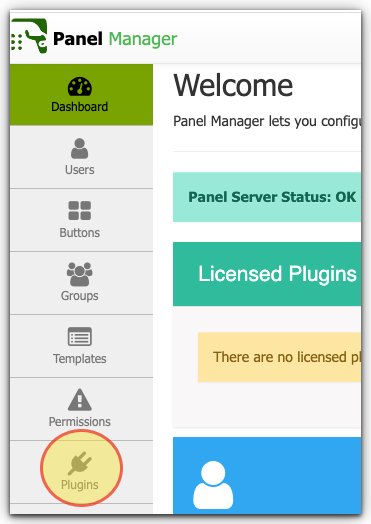
- Go to the Plugins section
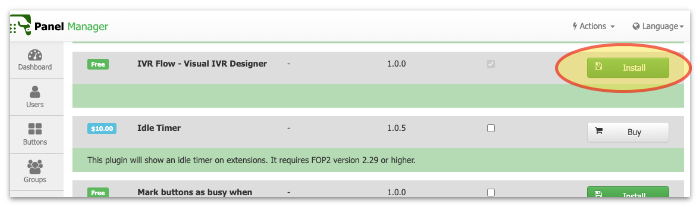
- Find IVR Flow and click Install
After installation you must restart the FOP2 service:
service fop2 restartOnce installed and restarted, a new IVR Flow menu entry will appear in the FOP2 Manager sidebar.
Extra Packages for Text To Speech
IVR Flow includes a Text to Speech block. On Issabel, PicoTTS is usually already available and provides a solid built in option for several languages. The module also includes a Google Translate based engine that is useful for testing, but it is not intended for production use.
If you want to use the bundled Google TTS helper on Issabel or FreePBX, install these packages first:
yum -y install perl-LWP-Protocol-https perl-Digest-MD5 mpg123Other TTS engines, such as cloud based providers, may require their own tools, SDKs, or credentials.
Configuration
The module is preconfigured for standard Issabel and FreePBX systems. In most cases you only need to review the settings and choose the Text to Speech engine you want to use.
Open the Plugins page, locate IVR Flow, and click Settings. The main options are:
Asterisk Extensions Conf File
This must point to a valid Asterisk dialplan file. IVR Flow will add one include line to this file so generated dialplans can be loaded by Asterisk.
IVR Flow requires execincludes=yes in /etc/asterisk/asterisk.conf. Issabel and FreePBX usually already enable this.
Dialplan Generator Script
Full path to the script that generates the IVR Flow dialplan. On a standard installation you should not change this value.
TTS Engine
Select which engine IVR Flow should use for text to speech generation. Included definitions commonly include picotts, googletts, and amazonpollytts.
TTS Engine Definitions
JSON encoded text to speech definitions. Custom engines can be added here. Each definition should provide:
- lang: available languages or voices
- cmd: dialplan command used to generate the speech audio
The cmd value can use these placeholders:
- [TEXT]: text to convert to speech
- [LANG]: selected language or voice
Licensing
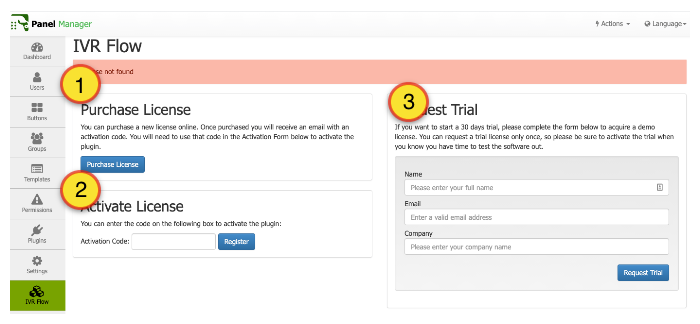
If you do not have a license in place, you will see the page with a link to our online store to purchase one on the top left panel (1), another form down below to enter the activation code that you will receive once you purchase the license (2), or a big panel on the right with a small form to request a 30 days trial license that will be retrieved and activated right away (3)
IVR Flow is a commercial module. You can request a 30 day trial license to evaluate it before purchasing.
The standard license costs $150 USD per server and includes one year of use for the visual editor. Annual renewal is required to keep creating or modifying flows from the editor. Renewal cost is $30 USD.
If a paid license expires, existing IVR flows continue working, but you will not be able to edit or create flows until the license is renewed. Trial licenses behave differently: once the trial expires, the created flows stop working until a purchased license is activated.
Notes
- IVR Flow can branch calls based on API responses, logic conditions, time conditions, selected options, or spoken words through Asterisk speech capabilities.
- It is a good fit for both classic IVRs and more advanced guided call workflows.
- For speech recognition setup with Vosk, see the Issabel installation reference.